Want to learn to code but don't know where to start? You're not alone. Every coder you have ever heard of started with one simple line of code. The good news: you don't need to be a genius, you don't need expensive software, and you can start today.
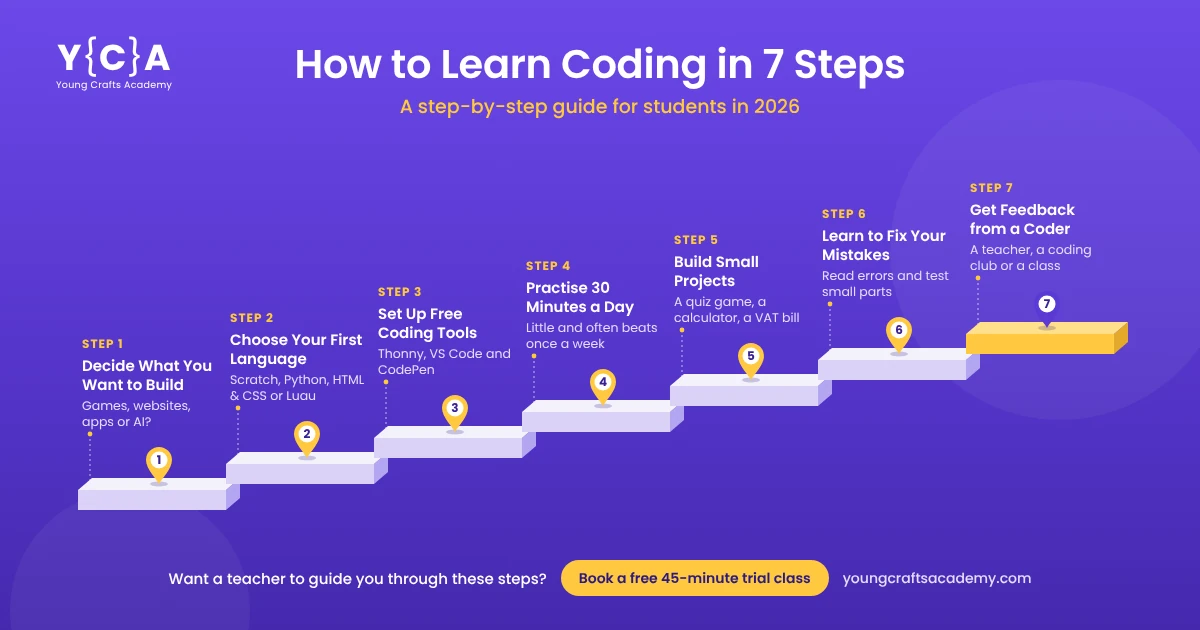
Here is how to learn coding in 7 steps:
1. Decide what you want to build: a game, a website, an app or something with AI.
2. Choose one beginner-friendly language, such as Scratch or Python.
3. Set up free coding tools on a laptop or computer.
4. Practice for 30 minutes a day.
5. Build small projects of your own.
6. Learn to fix your mistakes (this is called debugging).
7. Get feedback from a teacher, a class or friends who code.
This guide to coding for beginners explains each step in simple words, with a 4-week plan, free websites and answers to the questions students ask most.
What Is Coding? (A Simple Answer)
Coding means writing instructions that a computer can follow. Computers are fast, but they can't think for themselves. They do exactly what you tell them, step by step. Those instructions are written in a programming language, such as Python, Scratch or JavaScript.
Every game you play, every app on your phone and every website you visit was built with code. When you learn to code, you stop being only a user of technology and start becoming a builder of it.
How to Learn Coding in 7 Steps
Step 1: Decide What You Want to Build
Before you choose a language, ask yourself one question: what do I want to make? Your answer points you to the right starting place.
I want to make… | Start with |
Games | Scratch (younger students), Roblox Studio or Python |
Websites | HTML and CSS, then JavaScript |
Apps and useful programs | Python |
Things with AI, like chatbots | Python, then simple AI tools |
Not sure yet | Python (it opens every door) |
Having a goal keeps you motivated. "I want to learn coding" is hard to stick with. "I want to make my own quiz game" is exciting.
Step 2: Choose Your First Programming Language
The most common question beginners ask is: "Which programming language should I learn first?" Here is a simple answer.
Language | Best for | Why it's good for beginners |
Scratch | Students aged about 6 to 11, or anyone brand new | You snap colorful blocks together instead of typing. No spelling mistakes, just logic |
Python | Students aged about 10 and up | The easiest "real" typed language. It reads almost like English |
HTML and CSS | Anyone who wants to build websites | You see your result in the browser straight away |
Luau (in Roblox Studio) | Students who love Roblox | Roblox's own version of the Lua language. You build and script your own Roblox game |
If you are in Class 5 or above and can type comfortably, start with Python. It is often called the easiest coding language to learn, and it is the same language that professionals use for AI, apps and data. Our Python classes for kids start from the very first line of code.
Here is what your very first Python program looks like:
print("Hello, Nepal!")
When you run it, the computer shows: Hello, Nepal! That's it. You just wrote code.
Not sure whether to start with Scratch or Python? Read our guide: Scratch vs Python: Which Should My Child Learn First? Already finished Scratch? See what comes after Scratch.
Step 3: Set Up Free Coding Tools
You don't need to buy anything to start coding.
• Scratch: open scratch.mit.edu in your browser. It is free and was created at MIT.
• Python: download Python free from python.org. Start with Thonny, a free and simple editor made for beginners. When you're comfortable, move to Visual Studio Code (VS Code), the free code editor that professional developers use around the world.
• HTML and CSS: use VS Code with its free Live Server extension, which shows your web page in the browser and updates it every time you save. Don't want to install anything? Try CodePen, a free online editor where you write HTML and CSS and see the result instantly. New to websites? Read What Is Web Development?
• Roblox: Roblox Studio is free to download on a computer.
Can you learn coding on a phone? You can read lessons and try small exercises on a phone, and some free apps can run simple Python code on Android. But typing code on a small screen is slow and tiring. A laptop or desktop computer is much better. If you don't have one at home, use your school's computer lab or a family member's computer for your practice time.
Step 4: Practice for 30 Minutes a Day
Coding is like learning to ride a bicycle or play the guitar: you learn by doing, not just by reading. Thirty minutes every day is better than four hours once a week. Your brain remembers what it uses often.
Here is a simple 4-week plan for Python beginners:
Week | What to learn | Mini challenge |
Week 1 | Printing text, variables (boxes that store information), taking input from the user | Make a program that asks your name and age, then greets you |
Week 2 | If and else (making decisions), comparing numbers | Make a program that tells whether a number is odd or even |
Week 3 | Loops (repeating steps), lists | Print a multiplication table for any number |
Week 4 | Functions (reusable blocks of code), putting it all together | Build a number guessing game from start to finish |
Keep a notebook. Write down every new thing you learn and every mistake you fixed. In a month, you will be surprised how far you have come.
From our classroom: The students who improve fastest in our YCA classes are not always the ones who are best at math. They are the ones who code a little every day and are not afraid of red error messages.
Step 5: Build Small Projects of Your Own
Watching tutorials feels like learning, but building is where real learning happens. After each new skill, make something small with it. Start with projects you can finish in an hour or two:
• A calculator
• A quiz game about your favourite subject
• A program that converts temperature from Celsius to Fahrenheit
• A simple shopping bill with VAT
• A Scratch animation or game
Need more ideas? Try our 10 Python Project Ideas for Kids in Nepal, or follow How to Make Your First Game in Scratch.
Step 6: Learn to Fix Your Mistakes (Debugging)
Your code will show errors. Every coder's code shows errors, even experts'. Fixing them is called debugging, and it is one of the most useful skills you will learn.
When something goes wrong:
1. Read the error message slowly. It usually tells you the line number and what went wrong.
2. Check the small things: a missing bracket, a spelling mistake or wrong spacing.
3. Test one small part at a time instead of the whole program.
4. Explain your code out loud, line by line. You'll often spot the mistake yourself.
5. Then ask for help: a teacher, a friend or an AI tool.
From our classroom: When a student is stuck, we ask them to explain their code to us line by line. Very often, they find the mistake themselves before they finish explaining.
Using AI tools wisely: AI tools can explain an error message or give you a hint. But if you copy code from AI without understanding it, you learn nothing, and you won't know when the AI is wrong (it often is). Use AI like a helpful tutor, not like someone doing your homework.
Step 7: Get Feedback from Someone Who Codes
Learning alone is possible, but it is slower. Many self-learners get stuck on one problem for days and give up. A teacher or a coding class helps you:
• Find mistakes quickly, so you don't waste hours
• Learn good habits from the beginning
• Stay motivated, because someone is checking your progress
• Know what to learn next
You can also join coding clubs at school, take part in coding competitions or share your Scratch projects with the Scratch community.
Want a teacher to guide you through these 7 steps? At YCA, students follow a path like this in live classes, online or in Kathmandu. Book a free 45-minute trial class to find your starting point.
How Long Does It Take to Learn Coding?
It depends on how often you practice and what you want to build. Here is a realistic guide for a student who practices about 30 minutes a day:
Goal | Typical time |
Write your first working program | Your first day |
Understand the basics (variables, if-else, loops) | 1 to 3 months |
Build small games and projects on your own | 3 to 6 months |
Feel confident and start bigger projects | 6 to 12 months |
Coding is not something you "finish". Even professional programmers keep learning new things every year. For detailed timelines, read How Long Does It Take a Kid to Learn Python? and How Long Does It Take to Learn Scratch?
Is Coding Hard to Learn?
Coding is not as hard as people think, but it does need patience. The first week can feel strange because you are learning a new way of thinking. After that, most students find it fun, a bit like solving puzzles.
What makes coding feel hard:
• Trying to learn too many languages at once
• Watching videos without typing any code yourself
• Giving up after the first few errors
What makes it easier:
• Sticking to one language until you are comfortable
• Practicing a little every day
• Building projects you actually care about
Do you need to be good at math's? For beginner coding, basic math's (adding, multiplying, comparing numbers) is enough. Logical thinking matters more than math's. Read more: Does My Child Need to Be Good at Math to Learn Python?
How to Learn Coding for Free: Best Free Websites
You can start learning coding for free. These websites are trusted by students around the world:
Website | Good for | Level |
Scratch (scratch.mit.edu) | Block coding, games and animations | Complete beginners, younger students |
Short, fun coding and AI lessons | Beginners | |
W3Schools | Python, HTML, CSS and JavaScript tutorials with "Try it yourself" examples | Beginners to intermediate |
Khan Academy | Free computer programming lessons | Beginners |
freeCodeCamp | Web development and Python courses | Older students (about 14+) |
Harvard's CS50 | A famous free introduction to computer science | Advanced teens |
Free websites are a great start, but they have limits. No one checks your work, no one answers your questions on the spot, and it's easy to lose motivation. Many students start for free, then join a class when they get stuck or want to go faster.
How to Learn Coding by Making Games
Making games is one of the most fun ways to learn coding, because you can play what you build. A good path:
1. Scratch: make simple games like a maze, a catching game or a quiz. You'll learn how games work: movement, scores, levels.
2. Roblox Studio: build your own Roblox world and script it with Luau. Great if you already love Roblox.
3. Python: make text games first (number guessing, rock-paper-scissors), then graphic games with a library called Pygame.
Start small. A finished simple game teaches you more than a half-built "dream game". At YCA, students can learn this step by step in our Roblox Game Development course and Scratch course.
Coding at School: Nepal's New Python Syllabus for Class 9 and 10
If you study in Nepal, coding is now part of school too. Nepal's Curriculum Development Centre (CDC) has replaced QBASIC with Python in the Computer Science subject for Class 9 and 10, and Class 10 also includes a unit on AI. That means many students will meet Python in school, and those who start early will find it much easier.
Studying abroad? Many schools teach Python too. In the UK, GCSE Computer Science courses often use Python, and in India, CBSE students can take Artificial Intelligence as a subject in Class 9 and 10. Learning coding now gives you a head start in any of these.
Should You Still Learn Coding Now That AI Can Write Code?
Yes, and here is why. AI coding tools like ChatGPT, Claude, Cursor and GitHub Copilot can now write code from a simple instruction. Professional developers use them every day. But these tools don't replace coders. They make good coders faster.
Here is what AI changes, and what it doesn't:
• AI can write code quickly, but it often makes mistakes. Someone has to check that the code is correct and safe.
• AI only builds what you ask for. You still need to know what to build and how to break a big idea into small steps.
• When AI code breaks, someone has to understand it to fix it. That someone is a person who knows how to code.
So the skill is changing, not disappearing. Students who understand code can use AI tools well. Students who don't can only copy and hope it works.
Learning to code also teaches you skills that AI can't give you:
• Breaking big problems into small steps
• Thinking logically and spotting mistakes
• Creating your own games, apps and ideas instead of only using other people's
The Raspberry Pi Foundation, a UK charity that teaches computing to young people worldwide, made the same argument in 2025: young people still need to learn to code in the age of AI. The best plan today is to learn coding and AI together. Our AI classes for kids teach both, step by step. Read more in our guide to artificial intelligence in Nepal and why kids should learn AI.
A safety note: most AI tools have age rules. Some are for adults only, and others are for teens 13 and older, often with a parent's permission. Always check a tool's age rules, and use AI with a parent or teacher.
For Parents: How to Help Your Child Learn Coding
You don't need to know coding yourself to help your child.
• Give them regular computer time for practice, not only for games and videos.
• Ask them to show you what they built this week. Explaining it helps them learn.
• Praise effort, not only results. Fixing an error is a real achievement.
• Help them choose the right starting point for their age. Our Parent's Guide to Coding by Grade explains what to learn at each stage.
• Comparing coding classes in Nepal? Read Why Every Child Should Learn Coding in Nepal: A Parent's Guide.
• Consider a live class if they get stuck often or lose interest when learning alone.
Learn Coding with a Live Teacher at YCA
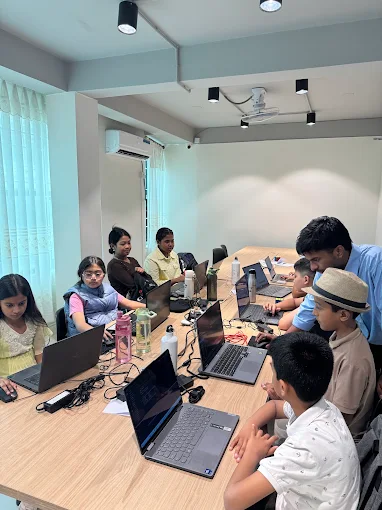
Learning on your own is a great start. Learning with a teacher is faster. Young Crafts Academy (YCA) runs live coding classes for kids in Nepal and online classes for students around the world. Every class has a real teacher, never pre-recorded videos, and a maximum of 8 students, so every student gets attention. So far, 500+ students and 10+ partner schools have learned with YCA.
• Courses: Scratch coding for kids, Python for kids, Web development for kids, AI classes for kids and Roblox game development
• Where: online from anywhere in the world, or in person at our center in Sankhamul, Kathmandu
• Every course ends with a real project you can show your family and friends
Not sure where to start? Book a free 45-minute trial class. Our teacher will find the right starting point for you, with no payment needed.


